Showing posts with label Mobile. Show all posts

Monday, May 30, 2011

Gingerbread Updates Start for Verizon Droids


The worst part of the android operating system is the major delay in operating systems updates,  but Gingerbread is FINALLY making its way around to the Droid X, Droid 2, Droid 2 Global and Droid 2 Pro. 


The list of features in Android 2.3 Gingerbread update are impressive, with the addition of  download manager, active app management, shortcuts, one-touch copy/paste, widgets, icons, app groups, updated calendar options, camera geotagging, improved email synching and camera auto-focus improvements.
Gingerbread 2.3 features also include user-interface refinements, audio effects, new media format support, and multiple-camera access.
It will take you approximately 20 to 40 minutes to download the software, depending on network conditions.


You can check for the update yourself on your Droid.  From the main menu, Tap Menu> Tap Settings> Tap About phone> Tap System update> Tap Download.
When updating any Droid phone, be sure that your battery is at least 40% charged and that you have at least half an hour to wait for the process to complete.  To be safe, you should also back up your contacts, photos, and note what software you had installed.
More details are available at the Verizon Droid X update support page.

source (Wireless and Mobile News)

Sunday, August 8, 2010

My Current Droid App Layout (using Launcher Pro)

Home screen:

-The Twitter widget small

-Pandora, Gtasks, Mute, Calendar

-Camera, Maps, Gmail, Foursquare

-Clock, Talk, Voice, facebook

-Changed Messaging launcher button to ChompSMS

Screen 1:(To the left)

-Weather and News Widget

-Divx Player, MortPlayer, Mp3 Music, Shazam

-Logmein, Gallery, Market, Skype Mobile

-ConnectBot, My Tracks, Yelp, Springpad

Screen 3: (to the Right

-Power Control widget

-OpenSpot, Blowaway,Bump, Droidlight

-Calculator, Movies, mAnalytics, Godaddy Mobile

-Barcode Scanner, Wells Fargo, Bank of America, Paypal

A Great app – Launcher pro


Google Froyo finally added some of the great features of Launcher Pro,  such as the desktop views and buttons to the left and right of the applications button, but still falls far short of Launcher Pro’s capabilities.

Launcher Pro has much faster widget response times,  smoother scrolling and sliding, much more customizations with the launcher buttons/icon docks, scrollable widgets, backup and much more…  did I mention it is free….

Check it out on the marketplace or at http://www.launcherpro.com/

Droid 2 confirmed : launches August 12

The Droid 2 is coming out, The slider Droid I have been waiting for!

With Android 2.2 (froyo), a MUCH better keyboard,  a faster processor (1ghz),  the motoblur UI interface, and more…  definitely worth a look at an upgrade! Here are the comparisons from Verizon and Motorola directly:

[source: BGR]

And here are the full detailed specs:

Detailed Technical Specifications of Motorola DROID2 A955

Physical:Attributes

Software+Environment

Embedded-Operating;System:
Google Android 2.2

Operating_System-Kernel:
Linux 2.6.32.9

Microprocessor,+Chipset

CPU+Clock:
1000 MHz

CPU:
Texas Instruments OMAP 3630
Browse devices based on OMAP 3630

Width-of-Machine:Word:
32 bit

CPU+Core:
ARM Cortex-A8

Level+1+cache:
32KiB data cache / 32 KiB instruction cache

Instruction:Set:
ARMv7

Memory,_Storage_capacity

RAM+type:
DDR SDRAM

RAM:capacity:
512 MiB

ROM:type:
Flash EEPROM

ROM+capacity:
7630 MiB

ROM-capacity:in;bytes:
8 GB (billion bytes)

Graphical-subsystem

Display-Type:
color transflective TFT display

Display_Resolution:
480 x 854 (409920 pixels)

Graphical:Controller:
PowerVR SGX530


Cellular+Phone

Cellular:Networks:
CDMA800, CDMA1900

Cellular:Data-Links:
cdmaOne, CDMA2000 1xRTT, CDMA2000 1xEV-DO Rel. 0, CDMA2000 1xEV-DO Rev A

Control+Peripherals

Positioning:Device:
Multi-touch screen

Primary_Keyboard:
Slide-out QWERTY-type keyboard, 45 keys
Automatic keyboard backlight (upon press of any key)

Directional+Pad:
Four-way (without action button)


Interfaces

Expansion+Interfaces:
microSD, microSDHC, TransFlash
Supports High Capacity (SD 2.0/HC) memory cards with capacity of up to 32GB

USB:
USB 2.0 client, Hi-Speed (480Mbit/s)
USB Series Micro-B (Micro-USB) connector

Bluetooth+(802.15):
Supported, Internal antenna

Wireless_LAN/Wi-Fi:(802.11):
IEEE 802.11b, IEEE 802.11g, IEEE 802.11n
Internal antenna

Infrared;Gate:
Not supported


Satellite:Navigation

Built-in:GPS;module:
Supported

GPS_Protocol:
NMEA 0183

GPS_Antenna:
Internal antenna

Complementary;GPS-Services:
Assisted GPS, QuickGPS, Geotagging

Built-in:Digital+Camera

Sensor-Type:
CMOS sensor

Resolution:
2560 x1920 pixels (4.92MP)

Autofocus;(AF):
Supported

Macro+Mode:
Supported

Built-in-Flash:
mobile light (LED)

Camcorder:
1080x720 pixels , 30frame/sec


Additional-Details

Built-in:accelerometer:
Supported

Additional_Features:

  • capacitive display
  • built-in digital compass
  • Motorola MOTOBLUR UI
  • Bluetooth stereo audio profile (A2DP
  • AVRCP)
  • haptic feedback
  • speech recognition
  • image stabilization
  • Google Maps Navigation
  • Google Search
  • Google Maps
  • Gmail
  • Google Calendar
  • Google Talk
  • Wi-Fi hotspot
  • face recognition
  • 8GB microSD

Tuesday, August 3, 2010

Froyo has arrived for the Moto Droid

Technorati Tags: ,,

What’s New in Android 2.2 (Froyo)

  • Download update.zip  (stock rom users only)
  • mount droid via usb and copy the file to mounted drive in the root folder
  • Make sure it is named update.zip
  • Turn your phone off. 
  • Boot into recovery (Hold Power + X).
  • Wait for a triangle with exclamation point to appear and release Power and X
  • Hit the volume up and camera button (half-way down) at the same time.
  • Using the D-Pad select “apply update.zip” and press in the gold button on the D-Pad.
  • Your phone will now run the update.
  • When it finishes, use th D-Pad to select reboot phone.
     

What do you get?

  • Flash (must be installed from the android market)
  • Wifi tethering and hotspot functionality
  • Bluetooth voice dialing
  • Enhanced google search bar
  • Move apps to SD card (to free up internal storage)
  • Better memory management
  • Better launcher features
  • Market now has auto-update settings!!
  • Gmail app enhancements
  • Contacts grouping enhancements
  • Better camera application!
  • New Car home
  • various performance tweaks that make it much faster than 2.1

Monday, August 2, 2010

Android is now the largest selling mobile platform for 2010

According to electronista and canalys  the mobile platform that is now the largest is Android, it is hard to see from raw numbers because of the multiple manufacturers. Motorola, HTC,and Samsung are all making their major platform Android,  this competitive market space has made for more  features,  higher quality handsets and rapid innovation that is going to leave closed platforms such as iPhone OS, Blackberry OS,  and Web OS scrambling to keep their market share.  Windows mobile also benefited from this model and will continue to do so,  but WinMo has serious ground to make up because their OS was so lackluster for so long.  Also the WinMo platform is not opensource. I dont see it as a threat to Android in the immediate future.  

UPDATE:


This the Nielsen Company also shows that Android is almost surpassing Apple for the last 6 months as the most ubiquitous operating system for smart phones.

The total subscribers Android is still almost half of iPhone OS but rapidly gaining ground.

(source Nielsen and Techcrunch)

Monday, July 26, 2010

Its now legal to Jailbreak your phone

Electronic Frontier Foundation
The EFF has won legal protections that make jailbreaking your phone legal:
http://www.eff.org/press/archives/2010/07/26
This is a huge stride for people rights and stopping the broad overreach of the Digital Millennium Copyright Act.
I am hoping this will also pertain to devices such as the routers, game consoles, dvrs ... etc  where people have put their own firmware or operating system and have been threatened with legal action.

Wednesday, July 21, 2010

Apple fights back with the death grip videos

Apple, in an battle to defend their exposed Iphone 4 antenna,  has tried to smear every other phone manufacturer for having attenuation problems.  If every other phone really had this problem that would make sense but the Iphone 4’s problem is very different than the common “death grip” attenuation problem. Apple exposed their antenna,  allowing your hand to bridge the two antennas and cause attenuation as seen here at the bridge point

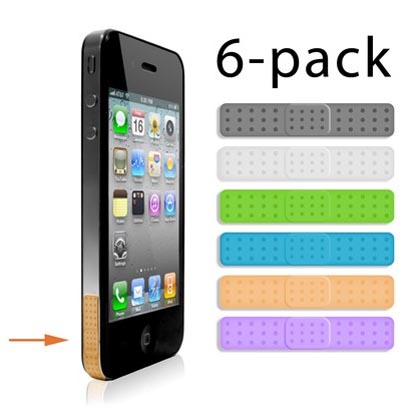
No other phone Apple has mentioned has an unexposed antenna,  they are trying to redirect a obvious design problem towards another issue,  if Apple were to cover this exposed antenna this would not be as big problem,  some humorous products are already out there:


apple iphone 4 antenna-aid


Hopefully Apple will pick up their dropped ball,  but it seems like for now,  they would rather keep the shiny design rather than a less conductive covered surface, choosing design over function.

Friday, July 16, 2010

The Motorola Droid reaches the end of its life

Technorati Tags:


According to droidforums.net the motorola droid has reached its end of life, that is sad news in one way, no new droids but if your droid gets damaged it will be replaced with a similar device,  which could mean the droid 2.

Wednesday, July 7, 2010

Android 2.2 improvements beating iOS4

Arstechica reported that the javascript engine in Android 2.2 has some huge performance benefits, blowing the doors off Apple’s flagship iOS4, as seen in the chart below:
Android 2.2 demolishes iOS4 in JavaScript benchmarks
With a Linpack score of 37.6 MFLOPs in Android 2.2, compared to 6.5 or 7 MFLOPs in Android 2.1, Android is finally gaining ground where it counts,  in performance.  Moto Droid users should see this update in mid July,   HTC plans to update the HTC Desire and Legend devices by Christmas according to Eric Lin of HTC PR,  My guess is a ROM will be released by http://www.cyanogenmod.com/ well prior to Christmas.

Tuesday, July 6, 2010

Froyo for the Droid


Rumor has it that froyo will be release for the motorola droid on July 13th.
Here are some of the features you can look forward to (from Robert Hallock):
Adobe Flash: confirmed
Android 2.2 comes bundled with Adobe Flash 10.1, the latest and greatest version of Flash. Handsets running Android 2.2 will have full access to the web’s flash content, including websites like Kongregate, PopCap games and Farmville.
Hulu is another big name at the top of everyone’s list when Flash is mentioned, but they’ve decided to sit this one out. Hulu has blocked Android 2.2′s Flash player citing copyright concerns; their content providers don’t want to be seen on any device but the desktop.
UPDATE: It is confirmed that Flash support requires a handset with a processor comparable to or better than the ARM Cortex-A8. In other words, every mobile prior to the Droid is off the table.
Applications on microSD: confirmed
If there is no space available for applications in an Android 2.2 handset’s onboard ROM, the applications will be automatically installed to your microSD card.
Just In Time compiler: confirmed
Android 2.2 comes packaged with a little piece of code called the just in time (JIT) compiler. A JIT compiler will increase the speed of Android and its applications by translating their code into a form that’s much faster for your phone to run.
The JIT compiler will help Android 2.2-powered handsets run 2-5x faster than the same model running Android 2.1
WiFi tethering: confirmed
Using a phone’s unlimited data plan, Android 2.2 handsets can use their WiFi chips like a wireless router to provide Internet to nearby wireless devices. It is not yet known if carriers intend to charge extra for this feature, but it is rather likely.
USB tethering: confirmed
Faster than WiFi, USB tethering turns your phone into a surprisingly snappy modem that can make quick work of basic web browsing. Like WiFi tethering, it is not yet known if carriers plan to charge for the feature but, again, it is rather likely.
Browsing speed boost
Dubbed “V8,” A new JavaScript engine has been baked into Android 2.2′s web browser. Google says it provides a two or three-fold performance increase when it comes to browsing the web.
Application updating
Users running FroYo can now configure any and all applications they have installed to automatically update themselves when a new version is available in the Android Marketplace. This auto-updating functionality is completely discretionary, and configured on a per-app basis. Users will also have access to an “Update All” button that updates every installed application.
Google also announced an online Marketplace, which allows users to browse Android applications from their desktop and then push them OTA to their Android handset.
OpenGL ES 2.0 improvements: confirmed
Google has announced several new APIs in Android 2.2 that better leverage a phone’s 3D graphics chip. It is not yet known how developers plan to make use of these changes.
Improved camera software
Android 2.2 revamps the camera’s user interface to support one-handed operation. A new series of radial menus and dials auto-rotate with the phone, and have taken the place of the old UI.
Revamped Google Voice Search
Google has put considerable work into refining the Google Voice Search experience. Where voice searching on Android 2.1 often produced inaccurate gibberish, demonstrations of the technology on Android 2.2 produced accurate results for complex phrases like “Barack Obama at the G8 Summit.”
Music streaming
Thanks to Google’s acquisition of Simplify Media, users will be able to stream their DRM-free music to their Android 2.2 handsets.  The same streaming technology can evidently be used to push music and videos OTA as well.

Sunday, November 8, 2009

The Palm Pre Vs The Droid

First off, let me say my primary phone for quite some time has been the HTC touch pro with a custom rom from sskusers.net. Not great by any means compared to other smart phones but I really am happy with verizon, so I was waiting for a real smart phone by them. I have been using the HTC with the palm pre (which was a gift) for a few months, and so my Pre review is an experienced review, where as I have only had the droid two days.

Palm Pre (activated with Sprint) :

Cons :
The notifications, all the notifications fill your hold screen and often take up valuable screen space, instead of being icons they are large first and then go away when you dismiss them, which isnt a problem with one application like mail, but if you use chat, twitter, set an alarm and have your calendar reminders, soon you have more reminders than screen.

The battery life: this device will stay in standby quite some time, but use it for calls and email heavily and it will be dead in less than a day.

The keyboard: The keyboard on the bottom is nice, but very tight, I cant type quickly.. and the copy and paste functions are challenging, there are no directional keys so you have to use gestures to move across the screen which isnt very easy.


Pros:

The camera is fast, it processes the photo in the background and takes bright quality pictures but it doesnt take any video, which is a huge oversight. The camera has no features either, like zoom, but the speed and quality make of for that.

Task management: The pre (webos) uses a cool task card system which makes finding a task and killing a task very easy and so intuitive, this is one of the nicest features of the operating system.

The form factor: small and sleek, this is a nice looking and relatively responsive phone.

Phone : the phone works well and is straight forward, the downside is that if you click a notification to clear it for a missed call, if immediately calls the person... this is really annoying.

Network: viewing webpages and getting email with this phone is great, I was surprised by sprints network.

Messaging: The email application on this phone is good and very easy to use. The IM/SMS system is also very nice, it has a combined contact, so if you IM someone and text them, it keeps them in the same thread.


The Droid:

What Can I say, I have only had this device two days and I am very pleased.

Cons:

The camera: This is a terrible camera, my settings must be wrong, it takes very dark photos and takes quite some time to do that. Its like an early era camera phone. I am hoping there is a firmware or tweak I can do to resolve this. video is equally dark.

Task management: There isnt a good task manager by default, so you have to download one but there are plenty, and plenty of good ones, but task dont usually exit so you will need a task manager to help you clean up your memory.

The keyboard: this is a pro and a con, its great to have one but this one is very tight to the top of the screen so it can be a little challenging to type, but overall not as bad as other reviewers have made it seem.

Moving desktop icons around: if you fill your desktop you have to trash an icon and then move icons around like one of those number puzzle games, or move the icon to another desktop but this isnt a huge problem unless you are moving icons often.

Pros:

Where to start

The Keyboard: it has one, I hate when I use a iphone and half the screen goes away so I can type, I cant see what I was working on which is a bit of a pain. With the droid, if you dont mind the half screen, you can use the onscreen keyboard or you can use the real keyboard.

The screen: It is high resolution and very nice to look at, switching from landscape to horizontal has little or no delay, this is another big plus. The touchscreen is also very responsive, a bit faster than the pre, but does not support multitouch at this point.

The CPU: many of these feature rich phones often are horribly underpowered, but the droid really performs here it is fast and responsive.

GPS: Another thing I am impressed with is how fast the droid locates the GPS satellites and finds its location. The HTC touch pro took way to much time to do this. Even better is with google navigation you dont need a tom tom or garmin, it gives you great turn by turn directions.

Networking: Verizon's network has always been fast but this device performs well on it.

Messaging: This also does the combined sms and IM thread that the pre does, but not a seamlessly, which i actually like, it will only combine them when you sms that particular person. Email is great for Gmail, just like any google app, it works incredibly well, I have not tried this with non google mail.

Apps: While not as many apps as the iphone, but more than the palm pre, this has a great app catalog with such heavy hitters as facebook, pandora, imeem, foursquare, and twitter, I even found a great ssh terminal application. It also has desktop widgets which are great, allowing you to see twitter et al updates from your desktop without launching the app.

Battery: I bought a spare battery because the Droids slim form factor and my heavy use tends to render a phone dead in a half day, but thus far, it seem like the droid will actually last a full day without a charge and heavy use. Again this is only after two days.

Summary

While I haven't had a iphone to compare the droid to, the palm pre is the closest contender, and while it does some things better (camera and task manager), the droid is just a more robust and functional device and operating system. It is the best smart phone I have used thus far. I would definitely recommend it. I will be keeping an eye out for a camera fix/update from Motorola, but its not a deal breaker for me.

Friday, June 5, 2009

Palm Pre Review

So after doing everything I could to get my hands on a palm pre, my friend Hooman came through an landed me this awesome device. My initial thoughts were around Sprint. This phone comes tethered to Sprint, which isnt a network that has the coverage I am used to. I must say in the 2 days I have been using the device, the voice quality is great and the network speeds are good. Back to the Pre, its a nice feeling device, it sits in your hand easily, its very sleek, but that will get old soon if it doesnt work well. The speed of the UI is impressive. I am a tough customer, and this device doesnt take long to boot up apps, its very easy to shut them down as well. Everything is just a gesture.

Phone

This is one of the coolest parts of the palm pre. With most touch devices, you "butt" dial or turn off features with your ear while talking, the palm pre included a proximity feature that allows your phone to sense when its in your pocket or next to your face and turns off the screen, eliminating accidental "touch" dialing or hanging up by ear. The rest of the phone is pretty standard and works well. It has a slide to unlock feature which is very good.

Messaging

Lets face it, texting is a key feature for any phone, and this phone does it very well. It combines all of your account messagers into one thread, so for example you can AIM someone then switch to sms and this all appears as one seamless thread, very impressive. I am a little disappointed with the configurations on this phone. If I just want to display I have an SMS, Email or MMS it should say so, but it shouldnt display all the info in the sms or email to prying eyes when my phone is laying around. So you either turn you notifications off or have the contents exposed when then phone is locked, there is no inbetween.

Web browser

No flash support but everything else works very well. It uses multitouch to zoom in and out on pages and renders very quickly. With Sprints 3g network there is almost no delay. Not much more to say here. Sprint defaults to a bookmark page where all your favorites are listed, which means it two keypresses to get to your default homepage but a nice interface.


Camera

This is biggest oversight on this device or lacking feature.. no video. I dont know why device designer skip this? As for the camera, the quality is good, 3.2 megapixels, the flash is ok, but no zoom.. overall not very much here in comparison to better phone implementations.

GPS
This phone has a fast gps radio, so location based apps work quickly, and a nice implementation

Applications

The app store is new, and has only a few apps, not much there. I am not sure if you can add your own app but it doesnt look that way, this is a big downfall. I should be able to install an app on my device even if palm doesnt want it on the webstore.

It does come with great apps like google maps and a youtube app and you can download where and pandora.

Keyboard

The palm pre has a slide down keyboard that is easy to use with both hands, I have large fingers and have no problems using it.

Battery life

It seems like power users will drain their device in a day, otherwise it should be fine for light users.

Cables

It uses the less common Micro USB as apposed to the very common mini usb, very lame choice, it might as well be a proprietary cable. Mine came with an induction charger as well, which is very cool. just set it on the charger, no cables.


Summary

Pros
For a pda that does your basic communicating, this is a great device, Its fast and easy to use and it has all the core features you would want.

Cons
lacking notification options, no video, no micro sd, and no non palm store applications.. This phone is probably not for a power phone user at this point, but with some os changes it could possibly be.

Thursday, February 28, 2008

BakeOff - The Blackjack 2 vs Moto Q Global

I recently ended my contract with Verizon to get a new PDA phone from AT&T. I wanted wifi and a touchscreen, but unless I wanted to carry a brick, I mean the tilt, i was SOL. I decided I would look at the Moto Q9h or Global vs the Backjack 2. The blackjack 2 was the first I tried. I am going to keep this simple:
The are both 3g, no wifi, 2.0 megapixel cameras and bluetooh


Pros:
Form factor
Size (fits well in the pocket)
different message and text indicators
led for charging and also email indication etc
more windows mobile controls for look and feel
better hot keys to lock and get to the task manager
Cons:
SPEED, the blackjack 2 is sluggish
The dial wheel is unresponsive for at least one turn.
Phonecalls are hard to hear
The moto Q9h
Pros:
keyboard (much easier for me to type on)
call quality - loud and clear, easy to use
camera flash- it has a very bright camera flash that does its job in low light
SPEED-while not noticeably faster than the blackjack 2 initially while running regularly it is substantially faster
accessories- it comes with a usb to mini usb adapter, opera browser, a better IM client, documents to go, a headphone adapter and a 2nd battery for extended use!
Cons:
if this guy had wifi and a touchscreen it would be perfect.
the hotkeys are not very good.
The windows key is awkward.
every once and a while the interface locks during heavy processing or heavy communication, this doesnt happen in the blackjack ii
I recommend the q9h over the blackjack 2, I usually am not a moto fan, but this is an good phone.

Sunday, July 29, 2007

Verizon LG Vx8600 Set your Search menu item to Google Mobile

Verizon usually cripples all the great functions on a phone and rarely lets you customize any options, especially the search page on the Mobile Web Browser, but here is how you do it if you have a Bluetooth link or USB cable to your LG Vx8600

Download and Install bitpim

Once setup, Run Bitpim, under view, check view filesystem.

On the left filesystem will appear. Click Filesystem and expand "/"

Download paramtable1.fil

(Do this at your own risk, I am not responsible for any damage to your phone)

Browse the filesystem, under OWS (click OWS) right click paramtable1.fil, click overwrite and select the version of paramtable1.fil that you just saved.

Then start the browser and select search from the menu (#3) and it should be google moble replacing the lame VZW search.

Verizon LG Vx8600 Change your WAP server

There a hidden menu in your Vx8600, type ##PROGRAM8600 SEND (##77647268600 SEND) You can change your WAP server here as well as the get it now server.

A confirmed open wap server is :

Wap gateway

An unconfirmed Open Wap server is:

Link1-IP1: 194.204.012.042
Link1-Port1: 9201

This will save you the $5 a month charge to verzion but still cost you airtime

Thursday, July 26, 2007

Verizon LG Vx8600

How do you get you save your phone book with LG verizon vx8600?

one way is to spend a bunch of more money with verizon and buy their sync kit, but I suggest another option using BitPIM. This is a great opensource package that works with most verizon phones. For the Vx8600 you will need to get the development version if you get the "provider blocked: unable to access filesystem " message, here is the version as of this article Development Windows install